
The Problem: No Time for Your Own Website
If you’re a solopreneur, startup founder, or part of a small team, you know this scenario all too well: you’re so focused on building your product or service that your own digital presence gets pushed to the bottom of the priority list.
The result? A dated landing page, a generic template that doesn’t reflect your expertise, or worse — no website at all. Meanwhile, potential clients are searching for professionals like you online, and your competitors with polished web presence are capturing those leads.
This case study documents how I built my own professional website — the one you’re reading right now — using modern technologies that deliver exceptional performance, SEO, and user experience.
The Solution: Modern Headless Architecture
Instead of choosing between a bloated WordPress theme or a limited website builder, I implemented a headless CMS architecture that combines the best of both worlds:
- WordPress as the content management system — familiar, powerful, and flexible
- Next.js 16 with React 19 for the frontend — blazing fast, SEO-optimized
- Tailwind CSS for styling — clean, maintainable, responsive design
- TypeScript for type safety and better developer experience
Technical Stack Breakdown
Frontend: Next.js 16 + React 19
The frontend is built with the latest Next.js 16, leveraging:
- App Router with React Server Components for optimal performance
- Static Site Generation (SSG) with Incremental Static Regeneration (ISR)
- Image optimization via next/image with automatic WebP conversion
- Font optimization using next/font with Google Fonts (DM Sans, Playfair Display)
Backend: WordPress Headless CMS
WordPress serves as the content API:
- REST API for posts, pages, menus, and custom endpoints
- Custom mu-plugins for menu exposure and enhanced functionality
- Yoast SEO integration for meta tags and Open Graph data
- Translio AI powered translation plugin
- Media library with optimized image delivery
Infrastructure: Digital Ocean
Hosting configuration optimized for performance and cost:
- Droplet: Basic Intel, 1 vCPU, 1 GB RAM, 25 GB SSD — $6/month
- Ubuntu 24.04 with Node.js 20 LTS
- Nginx as reverse proxy with gzip compression
- Let’s Encrypt SSL with auto-renewal
- PM2 for process management and zero-downtime deployments
CI/CD: GitHub Actions
Automated deployment pipeline:
- Push to
mainbranch triggers build - Dependencies cached for faster builds
- SSH deployment to production server
- Automatic rollback on failure
Analytics & Email
- Google Tag Manager (GTM) for tag management
- Google Analytics 4 for traffic insights
- SendGrid for newsletter subscriptions and contact forms
SEO Optimization
Search engine optimization was a priority from day one:
Technical SEO
- Server-side rendering — fully crawlable content without JavaScript
- Semantic HTML — proper heading hierarchy, landmark elements
- Structured data — JSON-LD schemas for Person, WebSite, BlogPosting, BreadcrumbList
- Canonical URLs — preventing duplicate content issues
- XML Sitemap — auto-generated with hreflang for multilingual support
- robots.txt — proper crawler directives
Multilingual Support
- English (EN) as default language
- Russian (RU) as alternate language
- hreflang tags for proper language targeting
- Language switcher with flag icons
Meta Tags & Open Graph
- Custom og:image (1200×630px) for social sharing
- Twitter Card with summary_large_image
- Dynamic meta descriptions from WordPress/Yoast
Performance Results
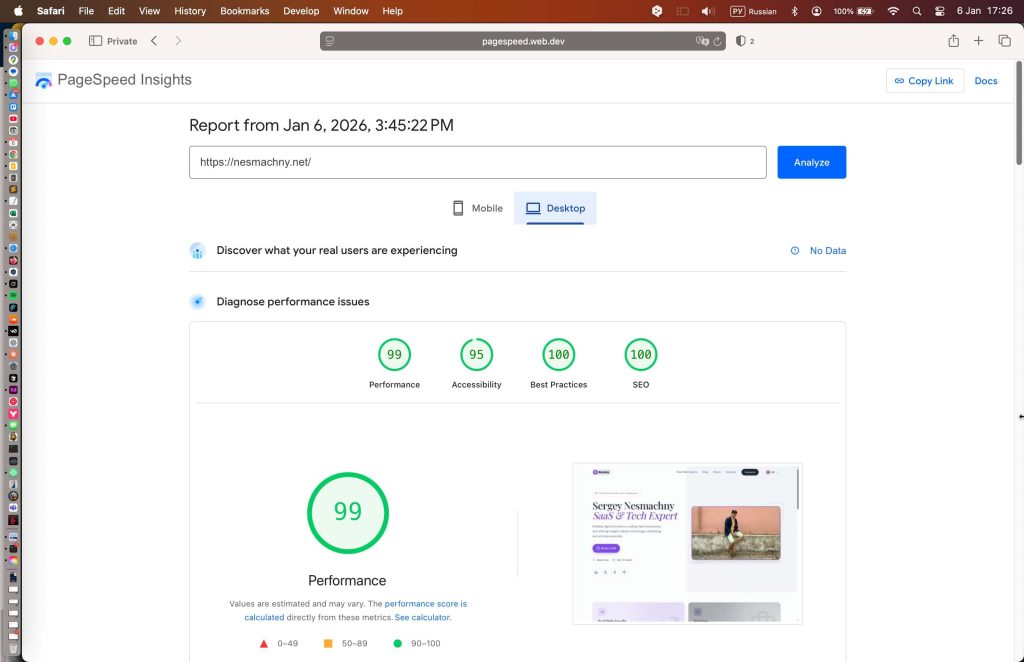
The results speak for themselves. PageSpeed Insights scores:
| Metric | Mobile | Desktop |
|---|---|---|
| Performance | 96 | 99 |
| Accessibility | 94 | 94 |
| Best Practices | 100 | 100 |
| SEO | 100 | 100 |
Core Web Vitals
- LCP (Largest Contentful Paint): 1.2s
- FID (First Input Delay): < 100ms
- CLS (Cumulative Layout Shift): 0.01
Key Features Implemented
- Responsive design optimized for all devices
- Blog with pagination and tag filtering
- Case studies section (Real Web Results)
- Services page with structured content
- Contact page with Calendly integration
- Newsletter subscription via SendGrid
- Social media integration (LinkedIn, X, Facebook, Telegram)
Development Timeline
- Week 1: Architecture design, Next.js setup, WordPress API integration
- Week 2: UI implementation, SEO optimization, deployment pipeline
- Ongoing: Content updates, performance monitoring, feature additions
The Bottom Line
A professional website doesn’t have to take months or cost tens of thousands. With the right architecture and expertise, you can have a high-performance, SEO-optimized site that truly represents your brand.
Need a Similar Solution?
If you’re facing the same challenge — too busy building your product to create a proper web presence — I can help. Whether you need:
- A landing page for your SaaS or service
- A personal brand website with blog
- A portfolio to showcase your work
- A headless CMS setup for your existing content
I’ll handle the technical implementation so you can focus on what you do best — building your business.
Get in touch to discuss your project. Reasonable timelines, transparent pricing, and proven results.